
-
Solutions ∨
-
Support ∨
-
Resources ∨
-
About ∨
-







 CAUTION !!!
After data loss, it’s recommended to take the following actions to maximize the recovery success:
Restore Your Files Now - Before It’s Too Late



TUTORIAL
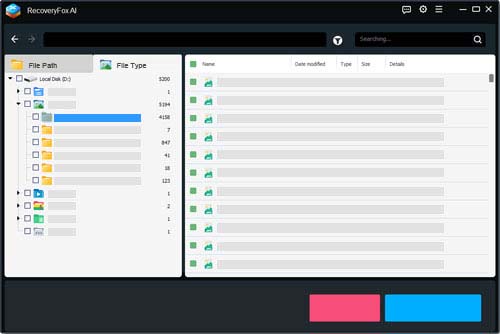
STEP 1. Select Location
Launch RecoveryFox AI and choose the hard drive, partition, or Recycle Bin where your data was lost.
STEP 2. Start Scan
Quick Scan locates recently deleted files instantly. Then, AI Scan deep-searches for more fragmented data.
STEP 3. Preview and Recover
Filter scanning results to preview lost photos or documents, then recover everything you need safely.
 WINDOWS RECOVERY
Experience smarter, effortless data recovery with RecoveryFox AI. Retrieve recently delete files, videos, and photos with their original filenames and folder structures intact. Our advanced AI scan deep-searches hard drives, USBs, and SD cards to rebuild lost or corrupted data with a high success rate.
Accidental Deletion Recovery
With a proven 98% success rate, RecoveryFox AI easily recovers permanently deleted files caused by "Shift + Delete" or accidental deletion.


Recycle Bin & Desktop Recovery
Recover files emptied from the Recycle Bin or hidden $Recycle.Bin system folders with RecoveryFox AI. It also offers quick access to restore lost desktop files on Windows.


Disk Partition Recovery
RecoveryFox AI offers seamless formatted file recovery and also uses AI-powered technology to recover data from RAW, unallocated, or lost partitions for fast, reliable partition recovery.

ZIP File Recovery
RecoveryFox AI delivers a flexible, professional ZIP File Recovery solution. It can reconstruct entire ZIP, RAR, 7Z, and other archives, or bypass corrupted structures to rescue intact data inside.

Document Recovery
Recover deleted/lost Word, Excel, PowerPoint, PDF, and other office files with advanced, AI-powered Document Recovery. It intelligently repairs corrupted documents or extracts intact data from partially damaged files.

Photo Recovery
Recover JPG, PNG, RAW camera photos, and graphic design files from HDDs, SSDs, cameras, USB drives, SD cards, and other storage devices with RecoveryFox AI Photo Recovery Software.

Hard Drive Recovery
Easily restore lost data from internal or external hard drives, including HDDs and SSDs. Supports formatted, corrupted, inaccessible, and RAW hard drives on Windows.

USB Data Recovery
Fully compatible with NTFS, exFAT, and FAT32 file systems, RecoveryFox AI delivers a smooth, efficient USB Data Recovery solution across all major thumb drives, flash drives, and memory sticks.


File Preview
Scan and preview for free before file restoration.

File Repair
Repair and piece together scattered fragments to recover usable content from corrupted documents, images, and more.

File Filter
Quickly find your target files by filtering on File Path, Type, Modification Date, Size, and File Name.

Folder & Filename Recovery
Instantly recover recently deleted files with their original names and folder structure intact.

Recovery Service
Contact us whenever you need help. Every purchase is backed by a risk-free money-back guarantee.
 PURCHASE
1-WEEK
Perfect for everyone’s emergency recovery needs
$49.95
No automatic renewal
1-MONTH
Perfect for casual users, businesses, freelancers handling short-term projects
$59.95
No automatic renewal

1-YEAR
Perfect for professionals, businesses, or anyone prioritizing long-term data security
SAVE 22%
$69.95 $89.95
No automatic renewal

LIFETIME
Perfect for power users, IT experts, businesses, content creators seeking a permanent solution
SAVE 33%
$99.95 $149.95
One-time payment
Preview for Free, Upgrade to Recover!
Scan your drive and preview lost files for free. See what’s recoverable before you upgrade. 100% safe and secure.
Tech Specs
Software Requirements
Windows OS: Windows 11/10/8.1/8/7/Vista, Windows Server 2022/2019/2016/2012/2008/2003
File System: NTFS, exFAT, and FAT32
Hardware Requirements
CPU: 1 GHz or faster x86- or x64-bit Intel or AMD processor
RAM: 4 GB minimum (8 GB and higher recommended)
HDD: 1 GB minimum space for installing
 FAQ
FAQ
See What Our Users Ask Frequently
Yes. RecoveryFox AI is clean, safe, and secure to use. The installer contains no bundled software, ads, or malware, and the program is verified clean by major antivirus engines. RecoveryFox AI can also work completely offline, so your files and scan results stay on your local device without being uploaded or collected.
The time depends on factors like drive size, drive health, file system, and hardware speed. For smaller drives or limited data, it can take anywhere from a few minutes to an hour. Larger drives or extensive recoveries may take hours or even days.
Connect the external hard drive to your PC, launch RecoveryFox AI, select the drive, and start scanning. After the scan, preview the recoverable files, select what you want to restore, and save them to a different drive to avoid overwriting.
Yes, in many cases. RecoveryFox AI can recover data from SSDs affected by deletion, formatting, partition loss, or file system errors. However, recovery success may be lower if the SSD is physically damaged or TRIM has permanently erased the data.
If you stop using the impacted device right after data loss to prevent overwriting, and then do a Quick Scan with RecoveryFox AI, you possibly retrieve all your data along with the original filenames and file structures. In typical data loss occasions such as accidental deletion, formatted drives, partition loss, or logical errors (e.g., corrupted file systems), this file data recovery software can achieve up to 98% recovery rate with the support of advanced AI scanning algorithms.
 WHO WE ARE
Know about RecoveryFox
WonderFox Soft established in 2009, adheres to the philosophy of “Tech for Needs, Users at the Core”. We offer a series of well-acclaimed products for audio, video, images, documents, and DVDs, serving over 10,000,000 users across 180+ countries and regions.
RecoveryFox AI is our latest innovation, designed to address users’ concerns about data loss and their urgent need for recovery. Built on 15+ years of technology expertise, it empowers individuals and businesses with Smart, Fast, and Reliable recovery solutions!
“Recover Smarter, Restore Safer” is WonderFox Soft’s unwavering commitment to delivering cutting-edge data recovery solutions that prioritize efficiency, privacy, and precision. Your trust drives us to create technology that truly matters!

15+ Years Experience

180+ Countries

Millions of Users

Reviews & Awards

Responsive Support

100% Secure Virus-Free

Money-Back Guarantee

Never Collect User Data



Terms and ConditionsPrivacy PolicyLicense AgreementRefund PolicyCookies Policy
Copyright © 2026 RecoveryFox. All Rights Reserved.


 Windows







 English ^


